
How to modify the sampled item list
The New, Edit, and Delete buttons for the Sampled Item List allow you to enter, edit, or remove items from the list.
Selecting the Insert command displays the configuration window shown in the figure:
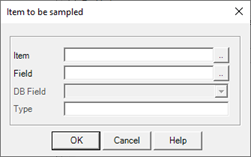
The window has the following configuration fields:
|
Item |
Specifies the name of the item to be sampled. Pushing the button next to the field, a popup hows the list of available items.. |
|
Field |
Specifies the field to be sampled. |
|
DB Field |
The field is meaningful only if the ODBC format for archiving has been selected. Specifies the database field for the registered value. The database field type must be compatible with the sampled data type (for example, the Description field must be for a text database field). |
|
Type |
Selecting a field displays the type of the selected database field in this box. |