Login
The login procedure allows the user to access the system with their own rights.
The login window is called by an appropriately configured control element, and requires the operator to enter his own identifier and password; if the data entered is correct, the system recognizes the user and enables the access privileges configured for his account. Any previously connected user is automatically logged out.
The Login window is shown in the figure:
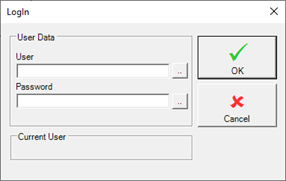
The Current User frame displays the name of the user connected to the system.
All the operations log, regardless of their outcome, are recorded in the historical system as Operator Events (Cf. Chap. Alarm Management in this guide).
Blocking user
A user is blocked when it exceeds the number of consecutive configured login attempts (see section Configuration of the security management system).
Automatic locking prevents system attacks.
To revoke the block, simply uncheck the Blocked box in the user properties window (see the section Configuring Users for Security Management and Configuring Users in Run-Time). This operation is generally performed by the administrator, who accesses the configuration of users during the run-time phase.
How to call login form
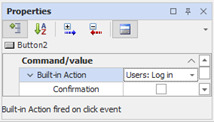
To open the login form it is necessary to configure the Users: login action in a page object (for example a button).
The following example shows the configuration of an animation: