LogOut
The LogOut procedure disconnects the user from the system, revoking all the access permissions granted at the time of connection and resetting the default permissions.
The connected operator can terminate his work session at any time by acting on a specially configured command element (action User: logout).
Disconnection is required to prevent subsequent users from having access privileges of the last connected user.
A Login operation automatically disconnects any previously connected user before connecting the new user.
Automatic Logout
The automatic logout disconnects the user after a certain period of activity (See paragraph User configuration).
This function prevents the use of the system by people other than the operator, exploiting a session left open.
How to LogOut
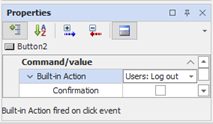
To allow the user to perform a LogOut operation it is necessary to provide a special command element (animation, menu or keyboard event) for which the Users: LogOut action has been configured.
The following example shows the configuration of an animation: