
Project propterties and statistics
The Project Manager allows you to associate some descriptive data on each project. These data are initially entered at the time of creation or duplication of a project, and may subsequently be amended. Some data (location, date of creation ...) are automatically computed by the system and can not be edited. The name of a project can not be changed.
Project data can be viewed and modified via the properties window of the project, and are also displayed in the list of projects if you set the display mode Details.
To change the data of a project:
- Select the desired project
- Select the command Property from the menu View. The system displays the configuration window Property Project:
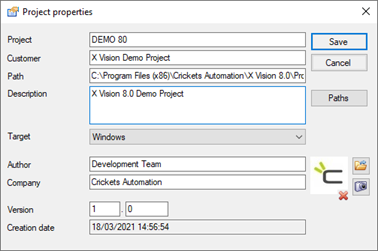
- Modify the desired data, then select Save to confirm the changes.
The window Property Project includes the following fields:
|
Project |
Name of the project. Is introduced at the time of creation of the project (commands New Project or Copy Project) and coincides with the name of the address of the project. The Project Manager does not allow changing the name of an existing project. The name must be unique and must be subject to the naming constraints imposed by the Operating System. |
|
Customer |
Customer name. This field is used to perform the grouping of projects when the list of Project Manager mode is set Group by customer. The text is completely free. The entry is optional. |
|
Route |
Displays the full path of the selected project. The content of the field can be selected and copied, but it is not editable, being automatically computed based on the actual structure of directories. |
|
Description |
Text describing the project. The text is completely free. The entry is optional. |
|
Author |
Name the author of the project. Is initially populated with the name of the current user of the PC and is freely editable. The entry is optional. |
|
Company |
Name of the company. The field may contain any text. The entry is optional. |
|
Version |
Version of the current project. We distinguish a number of Version proper (or major version), expressed by the number to the left of the point, and a number of Review (Or minor version) Expressed in number to the right of the point. it is generally agreed to increase the major version number, by resetting the revision number, when significant changes are made to the project, and to increase the revision number (at the same version number) as a result of minor corrections or changes. The management of version numbers is delegated to the operator. If the major version number is changed, the revision number is automatically reset. For new projects the field Version is automatically set to 1.0. The release of a version number is mandatory. |
|
Created |
Displays the creation date of the project. The content of the field can be selected and copied but not editable. |