
Rotating and reflecting objects
Geometric shapes, texts and images can be rotated with respect to a freely configurable rotation center.
Settings for the rotation are defined in the node Rotation, under the Appearance category in the properties grid:
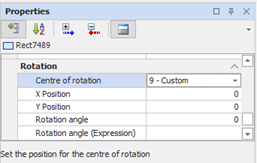
The angle of rotation can also be changed through the rotation tools available in the toolbar and menu Layout:
|
|
Rotate Left 90 ° Increments of 90 ° the current rotation angle of the object |
|
|
Rotate Right 90 ° Decreases of 90 ° the current rotation angle of the object. |
|
|
Free Rotation Allows you to select a default rotation in the drop-down box or enter a value of freely rotating |


The tools also allow reflection of the reversal of the object relative to the vertical axis or horizontal:
|
|
Flip Horizontally Reverses the selected object with respect to a symmetry axis of the outer vertical |
|
|
Flip Vertically Reverses the selected object with respect to a symmetry axis of the outer horizontal |

