
Selecting columns displayed
You can specify which columns should be displayed, both on screen and in print, and the order in which they should appear.
To select the visible columns, select the Options command from the Tools menu. The program displays the Options window:
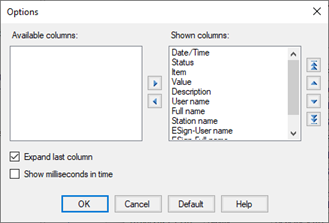
The Displayed Columns list lists the columns in the current layout. The columns that are excluded from the view are kept in the Available Columns list. To add a column to the layout, transfer it from the Available Columns list to the Displayed Columns list using the appropriate keys or by dragging. In the same way, you can remove the columns from the Displayed Columns list, returning them to the Available columns list.
The order in which the columns appear in the Displayed Columns list reflects the order in which they are displayed. You can change the display order by using the vertical shift buttons.
By enabling the Expand Last Column option, the last column is dynamically scaled according to the width of the window, while still maintaining the minimum size.
To reload the default configuration choose Default.