
User configuration
Users are configured using the integrated User Management window in the X Editor. To access it, select the Users command from the Configure menu or double-click on the Users node in the project window.
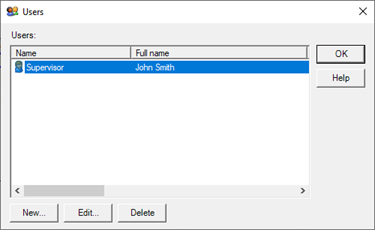
The New, Edit and Delete buttons respectively allow you to enter a new user and edit or delete an existing user.
The New and Edit commands display the User Properties configuration window, Illustrated in the figure:
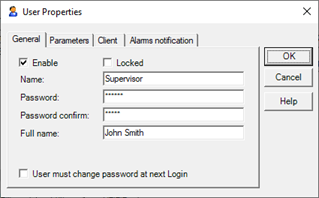
The window has three tabs. The General tab allows you to configure the properties of general data and enabling user.
Parameters tab lets you define the user's rights (Areas and security level) and the options for managing access.
The Alarms Notification tab contains fields for configuring the user's contact information for the remote alarm notification, and is unrelated to security management. For more information about the configuration of the parameters related to the card Alarms Notification see "Remote installation of Alarms".
The following describes the fields for configuring users for the purpose of security management:
General tab
|
Enable |
Enables the user recognition. By unchecking this box you can temporarily exclude a user from the system without removing the data. The system denies access to disabled users. Disabled users are represented in the user list with a grayed icon.
|
|
Locked |
A user is locked (i.e. temporarily excluded) when performing a number of connection attempts (bad password) than the number configured in the general parameters of the Security Management. Acting on this box, the administrator can remove the user's block. |
|
Name |
Defines the user's unique identifier in the system. |
|
Password |
Indicates the password matching the user, which allows access to the system. |
|
Confirm Password |
Type again the password entered in the Password field, for confirmation. |
|
Full Name |
Defines the full name (name / s and surname) of the user. Descriptive data required by some security protocols. |
|
User must change password at first login |
This feature increases security because the new user will be forced to immediately change the password assigned by the system administrator. In this way the password will only be known by the user |
Parameters tab
|
Security Areas |
Defines the security areas within which the operator is enabled to act. |
|
Security Level |
Defines the security level user within the areas of its relevance. |
|
Connection timeout |
Specifies the maximum connection time, in seconds, after which the user is automatically logged out. If set to 0, the connection time is unlimited. |
|
Password duration |
Specifies the length in days of the period of validity of the password: at the end of the set number of days the password is declared invalid, and after the next login the change is requested. |
The user configurator can also be called during display by means of an appropriately configured animation, menu or keyboard event. For more information, see "Configuring users in run-time" later in this chapter.