
Users configuration
The definition of system users allows to define who is authorized to access the system and to receive remote alarm notifications.
This section provides information on configuring the sending of notifications.
Enable and configure personal devices
The fields for enabling and configuring individual notification media is displayed on the Alarms Notification tab in the User properties window, as shown in the figure:
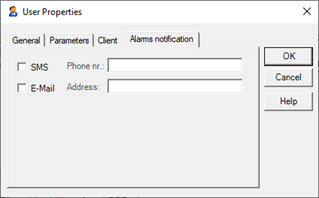
For each user you can set up the following notification media:
- Phone (Audio communication to landline or mobile phone)
- Fax (Send an alphanumeric message to the fax line)
- SMS (Sending a message with alphanumeric Short Messaging System technology to GSM mobile phone)
- E-mail (Sending an e-mail message)
The Alarms Notification tab includes the following fields for enabling and configuring individual notification media:
|
Phone |
If marked, enables the sending of unsolicited audio to the phone number specified in the corresponding field Phone n. |
|
Phone n. |
Specifies the phone number to forward the call. Note: specify eventual exit code (e.g., 0) and any break (e.g., 0, 02 ...) |
|
Fax |
If marked, enable faxing to the phone number specified in the corresponding field Fax n. |
|
Fax n. |
Specifies the phone number of the fax line to forward the fax. Note: specify eventual exit code (e.g., 0) and any break (e.g., 0, 02 ...) |
|
SMS |
If marked, enables the sending of SMS to the phone number specified in the corresponding field Phone n. It is necessary that the number refers to a GSM terminal and that the mobile operator which that number belongs supports the SMS service. |
|
SMS n. |
Specifies the phone number to send the message. |
|
|
If marked, enables sending e-mails to the address specified in the relevant field Address. |
|
Address |
Specifies the e-mail address to send messages. |