
Configuration of the alarm management system
The alarm management system is configured in the Alarm Configuration window; to access it select the Alarms command from the Configure menu:
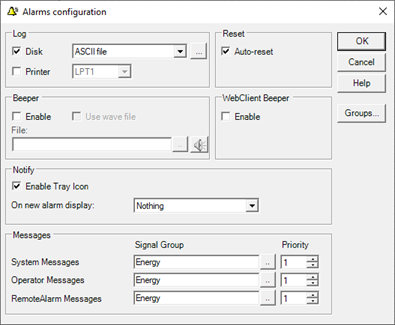
Caution! The changes made to the configuration of the alarm management system are immediately applied if the configuration window is closed using the OK key. To close the window ignoring any changes made use the Cancel button.
If an error occurs while reloading the configuration, a notification message is displayed. In this case, restart X Vision for the changes to take effect. Otherwise the system may exhibit unexpected behavior.
The window allows you to select how to historicize events, reset alarms, activate the beeper and visual notification.
It also allows to change the name of the Signaling Groups and to specify the group and priority of the internal messages (system messages, operator messages and RemoteAlarm messages).
Changing the name of signaling groups
The Groups ... button in the right part of the window allows access to the list of Signal Groups, which allows the renaming:
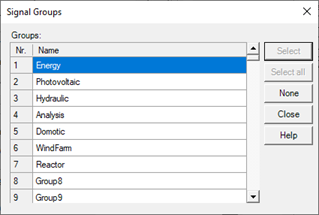
To change the name of a group, double click on it, then confirm the change with Enter.
Changing the recording parameters
The Recording group allows you to enable and configure logging of historical data on disk and to enable real-time printing of events:
|
Disk |
If selected, enables recording on disk (historical logs).
|
|
Duration |
Specifies the number of daily historical files to keep in the archive.
|
|
Printer |
If selected, it enables real-time printing of messages. The function requires a dot matrix printer connected to the PC parallel port. The port can be selected from the drop-down list.
|
Configuration of the alarm reset mode
The Reset group allows you to select how to reset the alarms generated by the system:
|
Automatic |
If selected, alarm messages are automatically deleted from the Alarm Summary lists when the alarm condition has returned and the alarm has been acknowledged. Otherwise, the alarm messages remain displayed even after the alarm condition has ceased and the acknowledgment has been made until the Reset command is applied.
|
Beeper configuration
The Beeper section allows you to configure the settings of the horn (beeper)
|
Enable |
Enables / disables the execution of acoustic signals.
|
|
Use .Wav files |
If selected, allows you to use a wave (.WAV) file in place of the system beeper.
|
|
File |
Allows you to specify the wave file to be executed as an acoustic alarm signal.
|
|
Preview |
The preview button (
|

Configuring visual notification options
The Notification section allows you to set additional notification options for new alarms.
|
Enable notification in Traybar
|
Enables the display of the X Vision icon in the System Tray. The icon makes certain functions available via the context menu and when a new alarm occurs, it flashes until it is acknowledged. It also allows notification via Balloon Tip.
|
|
|
Notify new alarm by |
Allows you to select a tool for notification of new alarms (for further information refer to the paragraph "Alarms Announcer"). The combo allows you to select one of the following settings:
|
|
|
|
· Balloon Tip |
Displays a notification message in the form of a ballon tip on the X Vision icon in the system tray, if enabled. Not available if the Enable notification in Traybar item is disabled.
|
|
|
· Announcer |
Show the Announcer
|
|
|
· None |
No additional notification procedure is undertaken. |
Messages section
The Messages frame allows you to configure the reporting options for the messages generated automatically by the system, and in particular for:
- System messages (automatically generated when changes occur in the system state)
- Operator messages (generated as a result of user operations)
- Messages from the Remote Alarms subsystem
For each message category, the Signaling group and notification priority can be selected.