
Defining alarms
For each signal to be monitored, an alarm definition must be configured. Each alarm definition allows to specify the monitored item (which must be of the Analogue or Digital type), the alarm conditions, the group of operators to notify the alarm and the transmission media to be used. Each alarm definition can finally be temporarily disabled.
To access the remote alarm configurator, select the Remote Alarm tab in the item configuration window.
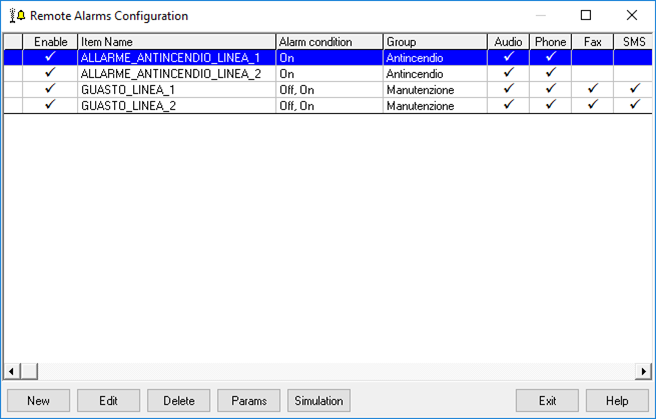
The window shows the currently defined remote alarm messages. The illustration shows four definitions already entered. The New, Modify and Delete buttons allow to execute the insertion, modification and cancellation of the alarm definitions; the Parameters button displays the configuration window of the general parameters of the alarm remoting system; the Simulate button simulates sending the alarm to the configured devices.
General parameters
The General Parameters window is displayed by selecting the General Parameters command.
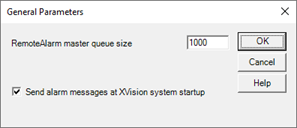
The window has the following configuration fields:
|
RemoteAlarm master queue size |
Specifies the size (number of elements) of the main queue system for remote control alarms. Allowed values: 100 .. 999999. Default value: 1000. |
|
RemoteAlarm drivers queue size |
Specifies the size (number of elements) of the RemoteAlarm broadcast media alarm queue. Allowed values: 0..999999. Default value: 10000. If the queue size of the drivers is 0 (zero), the system does not limit the number of messages in the queue.
|
|
Send alarm messages at XVision system startup. |
If not selected, it excludes the sending of system alarm signals at system start-up; the notification will be made only at the next status change of the configured items. |
Configuring an alarm
The Alarm property window is displayed by pushing the New or Edit buttons. Configures an alarm definition:
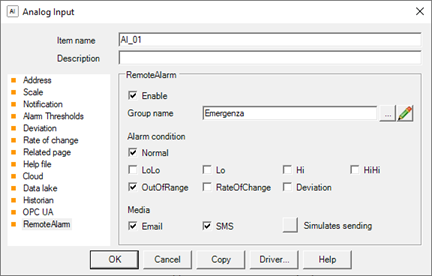
The window has the following configuration fields:
|
Enable |
If selected, enables the remote alarm management |
|
Item Name |
Specifies the name of the item to be monitored for alarm management. The change in the status of the item determines the processing of alarm conditions. Only Digital or Analog items can be selected. |
|
Alarm Condition The contents of the Alarm condition group vary depending on the type of the item specified in the Item Name field, as described below. You can select more than one alarm condition.
|
|
|
Hi |
If selected, the alarm is generated when the item reaches the High status. |
|
HiHi |
If selected, the alarm is generated when the item reaches the High High status. |
|
The |
If selected, the alarm is generated when the item reaches the Low status. |
|
LoLo |
If selected, the alarm is generated when the item reaches the Low Low status. |
|
Normal |
If selected, the nottification is generated when the item returns to Normal status (For example, can be used to notify the end foan alarm condition). |
|
Out of Range |
If selected, the alarm is generated when the item reaches the Out of Range status. |
|
For Digital items, the following check boxes are displayed. |
|
|
Off |
If selected, the alarm is generated when the item goes OFF (0). |
|
On |
If selected, the alarm is generated when the item comes ON (1). |
|
Group |
Specifies the operators group recipient of the notifications. You can manually type the name of the group or push the button "..." to select the group from the list of defined groups. |
|
Media |
|
|
Audio |
If selected, it enables the sound diffusion of the message defined in the Audio File field (v.), by means of a common sound card. |
|
Phone |
If selected, enables the telephone transmission of the audio alarm message to the operators for which the Phone option has been enabled and configured. |
|
Fax |
If selected, enables the notification of alarm messages via fax, to operators for which has been enabled and configured Fax option. |
|
SMS |
If selected, enables the sending of SMS messages to operators for which has been enabled and configured the SMS option . |
|
|
If selected, enables the sending of alarm messages through e-mail messages to operators for which has been enabled and configured E-Mail option. |
|
Audio File |
Specifies the name of the audio file in Wave format (* .wav) containing the recorded message to be used for sending the signal to the sound system (Audio) and by telephone. |
Important The file wave for the telephone notification must meet the format requirements provided. For more information, please refer to the next paragraph.
To close the window confirming the insertion of a new definition or modification of the data of an existing definition, select the button OK. To close the window without changing the previous alarm configuration, select Cancel.