
The Cross Reference window
The Cross Reference dockable window creates a report that locates Items and the Local Variables referenced in the main elements of the current project.
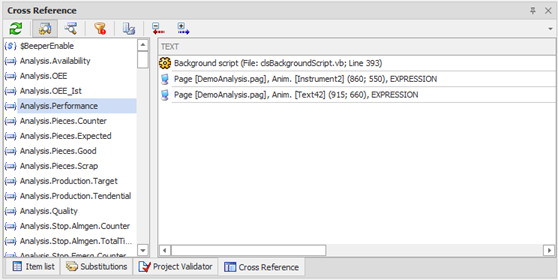
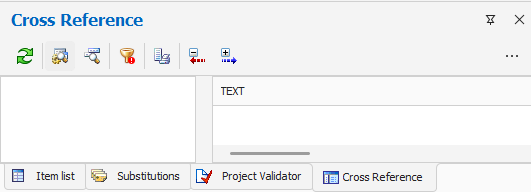
The Cross Reference is able to explore the references (item or local variables) contained in:
- Pages (general properties, animations, Keyboard Events page)
- Menu
- Events from System Keyboard
- Overall expressions
- Actions on Event
- Recipes
- DataLogger
- Scheduler
- Background Script
For each element are explored expressions, parameters and action scripts.
Note: search for items and local variables within the script extracts only the references in calls to:
- Function GetExpressionValue
- Function SetItemValue
- Method GetIndex (class Item)
- Method DeleteItem (RTDB class)
- Method InsertItem (RTDB class)
- Method GetLocalVariable
- Function SetLocalVariable
and any case is unable to locate the references if:
- The item names or Local Variables are passed to procedures by variables or constantsThe item names or Local Variables are obtained by strinmg concatenation or other functions.
Note: The Cross Reference explores pages from the saved copy on disk.
Running the Cross Reference
The Cross-Reference is not updated dynamically: it is therefore necessary to use the update command to generate or update the report. Selecting the command Update the system proceeds to search for references. You can limit the search to only those elements that affect and filter by name references excerpts:
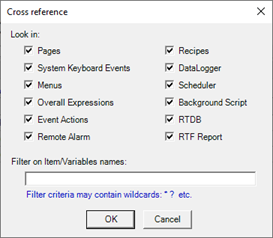
Note: the execution of cross-reference list can take from a few seconds to several minutes, depending on the items included in the research and their number and complexity.
The collected data can be viewed by organizing:
- for reference: Displays the report by listing, for each reference (item / local variable), objects in which it is referenced
- object: view the report by listing, for each object in the system, the references (item / local variable) it contains
You can switch between display modes using the buttons on the toolbar. By changing the display mode is not done reloading.
The references found are represented by different icons depending on whether the Item (  ) Or Local Variables (
  ). Any such references do not exist are shown graphically with an exclamation mark on the icon (
  ).
).
A special filter function allows you to limit the view to only references that do not exist.
For each occurrence the list provides with the necessary information leading to the location of the item. By double-clicking or by selecting the indication Locate from the context menu it is possible to automatically select the element that contains the reference.
Selecting the command Item Property from the context menu on the indication of an existing item you can open the properties window.
The toolbar at the top of the window makes the following commands:
|
|
Update Try a new scan of the references |
|
|
Report by Object Switch to Object |
|
|
Report by reference Switch to Reference |
|
|
Show only references that do not exist Restricts the display to only references that do not exist, for easy identification. |
|
|
Print Report Prints the report displayed |
|
|
Collapse All Collapses all nodes in the list |
|
|
Expand All Expands all nodes in the list |


The Cross List window can be displayed (or recalled if set as pop-up window) by selecting Cross-List from the menu View.