
Using the view filter
By default, History displays events from all Signals Groups, in the period between the current date and the previous two days.
You can change the displayed data range and also limit the display to events related to a specific item by changing the Display Filter. To change the display filter:
- Select the Filter ... command from the Tools menu.
- or -
Double-click on the Filter Status panel in the status bar - The system shows the Filter window:
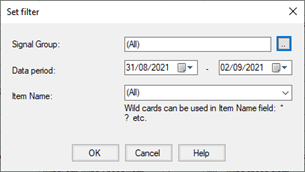
- Modify the desired parameters, then click OK to apply the filter or select Cancel to abandon the operation.
Parameters of the filter window:
|
Signaling group |
Specifies the signaling group for which events are to be viewed. You can set this policy to All to not apply any filters. The currently displayed group is shown on the left side of the History status bar. |
|
|
Date range |
Specifies the time interval to which the displayed data refers (start date - end date)
|
|
|
Item name |
It allows to filter the display limiting it to the only events concerning the selected item
|
|
|
|
(all) |
No filter
|
|
|
$System |
Displays only system events and operator messages. |
Note: In the Item Name field you can specify a filtering criteria containing wildcards (see "Joker Characters" in the "Common Editing Functions" paragraph.
By activating the display filter based on item name, the active item filter is displayed in the status bar. For example, activating the filter on item name for "INT_LINEA_1" in the status bar will have the following visualization:
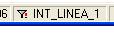
To deactivate the display filter and view the entire contents of the historical logs, set the filter to item name to "(all)".
In the main window you can quickly change the filter to item name (with the same filter parameters), setting it equal to the item name relative to the selected row, selecting the Item Filter command based on selection from the Tools menu or from the context menu on the data list. The command is enabled only if the Item Name column is visible.
You can also remove the filter on the applied item name (leaving the other filter parameters unaltered such as the period or the signaling group) by selecting the Remove item filter command from the Tools menu or from the context menu.